


🎧 Prefer to listen?
Video testimonials are one of the most effective ways to show real customer experiences and build trust with potential buyers. Authentic stories told by your own customers influence buying decisions far more than polished brand claims, and they turn hesitant leads into loyal customers. But collecting video testimonials is hard without the right tool. To help you decide, we compared the best video testimonial software for 2026: what each platform does well, where it falls short, what it costs, and which type of business it suits.
What Is Video Testimonial Software?
Video testimonial software is a platform that lets a business ask customers for a short video review, lets the customer record it in a browser or on a phone, and then helps the business manage, brand and publish that video without a film crew. Instead of emailing customers and waiting for large video files, you share one link or QR code. The customer records in a few minutes, and the video lands in a dashboard ready for your website, social channels, ads, emails or sales decks.
Most testimonial video platforms cover four jobs:
- Collect: a branded recording page, guiding questions and simple mobile or desktop recording.
- Manage: a central library where you review, tag, approve and download submissions.
- Polish: trimming, captions, transcripts, branding, filters or music.
- Publish: website embeds, downloads for ads, and sharing to social platforms.
Why Video Testimonials Matter in 2026
Buyers are surrounded by ads, influencer content and AI-generated copy. What still moves them is proof from people like them. A real face and a real voice create an emotional connection that a star rating or a text quote cannot match.
- Trust: prospects want to hear from existing customers before they buy, especially for higher-priced products and services.
- Conversion: a text review gets skimmed, while a short video holds attention longer and keeps prospects on the page where the buying decision happens.
- B2B and B2C credibility: whether you sell to companies or consumers, social proof is non-negotiable. Our guide on capturing video testimonials for Google and social media shows how to put these stories to work.
- Reach: as video marketing trends keep shifting toward short-form and user-generated content, customer videos double as social content, not just website proof.
Quick Answer: What Is the Best Software for Creating Testimonial Videos?
There is no single winner for every team, but the shortlist is clear:
- Vidlo is best for brands that want low-friction, fully branded customer videos collected through a link or QR code, with one-tap sharing to TikTok.
- VideoAsk is best for interactive, conversational video flows and funnels.
- StoryPrompt is best for AI-assisted collection and polished story videos.
- Senja is best for mixing text, image and video testimonials on one Wall of Love.
- Boast is best for larger teams that need structured feedback workflows.
- Testimonial.to is best for quick website embeds on a small budget, including a free plan.
The full comparison table and the in-depth review of each tool follow below.
How to Choose Video Testimonial Software
Not every video testimonial software solves the same problem. Some platforms focus on collecting customer videos, while others prioritize editing, publishing or enterprise workflow management. Before you choose, decide where video testimonials fit into your marketing process and which features will actually save your team time. These are the factors that matter most.
Easy Recording Experience
The easier it is for customers to record, the more testimonials you will receive. Look for software that lets people record directly from their browser or phone without downloading an app or creating an account. A frictionless recording experience almost always leads to higher completion rates.
Custom Branding
Your request should feel like part of your brand, not a third-party tool. The best platforms let you customize landing pages, logos, colors, domains and thank-you screens, and some add branded overlays or filters to the finished video.
Data Capture and Lead Generation
A testimonial request is also a touchpoint with a customer. Platforms that collect names, emails and answers to custom questions alongside the video turn every submission into usable customer data, and sometimes into a new lead or referral.
Editing and Publishing Tools
Collecting testimonials is only the beginning. Check how easily you can trim videos, add captions, create transcripts, embed videos on your website, build a Wall of Love, or download videos for social media and paid campaigns.
Distribution and Social Sharing
A testimonial that only lives in a dashboard does not build trust. Look for embeds for your site and emails, clean downloads for ads, and the option for customers to share their own video on social platforms, which extends your reach for free.
Automation and Integrations
As you grow, manually requesting testimonials becomes hard to scale. Platforms that connect to your CRM, email tool, help desk or automation tools such as Zapier and HubSpot can trigger requests automatically after a purchase, onboarding or a successful support conversation. If automation is your main goal, see our guide to automated testimonials.
AI Features
Many video testimonial platforms now include AI to reduce manual work: automatic transcription, subtitles, highlight detection, summaries and smart editing help marketing teams publish customer stories much faster.
Analytics and Performance Tracking
Testimonials are only valuable if you can measure results. Reports on submission rates, completion rates, views and campaign performance make it easier to improve your collection process over time and to prove ROI.
Pricing and Scalability
Pricing models vary a lot. Some providers charge by the number of responses, while others limit users, workspaces or published videos. Compare what each tier includes and whether the platform can keep up as your testimonial library grows.
Tip: Instead of choosing the software with the longest feature list, choose the platform that removes the most friction from your testimonial workflow. The best video testimonial software makes it easy to collect authentic customer stories, organize them, and publish them wherever they build trust and improve conversions.
Video Testimonial Software Buying Checklist
Before you sign up, run every shortlisted tool through these ten questions:
- Can customers record from a link or QR code with no app and no account?
- Does the recording page work well on a phone, including retakes?
- Can you fully brand the recording page and the finished video?
- Can you ask guiding questions so customers know what to say?
- Does it collect consent and customer details (name, email, custom fields) with each video?
- Can you approve, tag and download videos from one library?
- Are captions or transcripts included?
- Can you embed videos on your site and share them to social media?
- Does it connect to your CRM or automation tools, or offer an API?
- Is the price predictable as your number of videos and users grows?
Want to make sure the finished videos look great too? Read our guide on testimonial video production without a film crew.
Common Mistakes When Choosing a Testimonial Video Platform
- Choosing a tool that needs a download or an account. Every extra step is a reason for a customer to give up halfway.
- Paying for collection only. If you cannot easily embed, download or share the videos, they will sit unused in a dashboard.
- Ignoring analytics. Without submission and performance data, you cannot tell which requests work or measure ROI.
- Underestimating setup time. If a campaign takes your team hours to configure, you will not run it consistently.
- Forgetting consent. Make sure customers agree to how their video will be used, especially for ads.
Best 6 Video Testimonial Software Platforms for 2026
Here is our 2026 roundup of the top 6 video testimonial software platforms for brands that want to turn customer stories into conversions, not just a social proof page. Each tool was compared on ease of recording, branding, editing, integrations, sharing and price.
| Software | Best For | Free Plan | AI Features | Wall of Love | Video Editing | CRM / Zapier | Social Sharing | Starting Price |
|---|---|---|---|---|---|---|---|---|
| Vidlo TOP PICK | Social Growth & UGC | ✔ | ✔ | Coming Soon | ✔ | ✔ | TikTok Native | Free Trial |
| VideoAsk | Interactive Funnels | ✔ | Basic | — | Basic | ✔ | Limited | Free / $24 |
| StoryPrompt | AI Video Collection | ✔ | ✔ | ✔ | ✔ | ✔ | Limited | $39 |
| Senja | Text + Video | ✔ | Basic | ✔ | Basic | Limited | $24 | |
| Boast | Enterprise Teams | — | Basic | Widgets | Basic | ✔ | Manual | $50 |
| Testimonial.to | Simple Embeds | ✔ | — | ✔ | — | Limited | Limited | Free / $20 |
Vidlo is a top option for businesses that want to create branded, engaging video testimonials with ease. Vidlo prioritizes customization, so brands can personalize the whole testimonial experience, from the landing page to the final video. The platform collects both video and customer data in a way that fits into your wider testimonial marketing strategy.
Customers can also share your brand on their own social media, because they can immediately download their video or post it to TikTok. That is a major advantage for any testimonial collection software that aims to boost reach and user-generated visibility.
How Vidlo Works:
- Create a custom campaign: design a branded landing screen with your logo, colors and clear instructions for customers.
- Share it anywhere: distribute your campaign through a link or QR code, so customers can record anytime, anywhere, with no app and no login.
- Capture testimonials and data: collect videos together with details such as email addresses, birthdays or answers to custom questions.
- Social sharing: customers can post their videos directly to TikTok, expanding your reach.
- Repurpose content: use customer videos on your website, in social campaigns and in email newsletters.
- Real-time analytics: see how each campaign is performing.
Pros:
- Easy to set up: you can launch a campaign in under 5 minutes.
- Easy for customers: they scan a QR code or click a link to reach your recording page.
- Fully brandable: landing page, filter, branding and URL can all match your brand.
- Flexible audio: keep the customer’s own audio, add your own music, or pick a song from the Vidlo library.
- TikTok integration: customers can upload their video to TikTok right after recording.
- Analytics and customer data are available inside the platform.
- All videos from every campaign are stored in one dashboard.
- Responsive customer support.
- Free trial to test the platform before choosing a plan.
- Works well for brands, venues and music artists.
Cons:
- Social sharing is focused on TikTok; other native social integrations are still limited.
- A Wall of Love is not available yet but is in development.
Pricing:
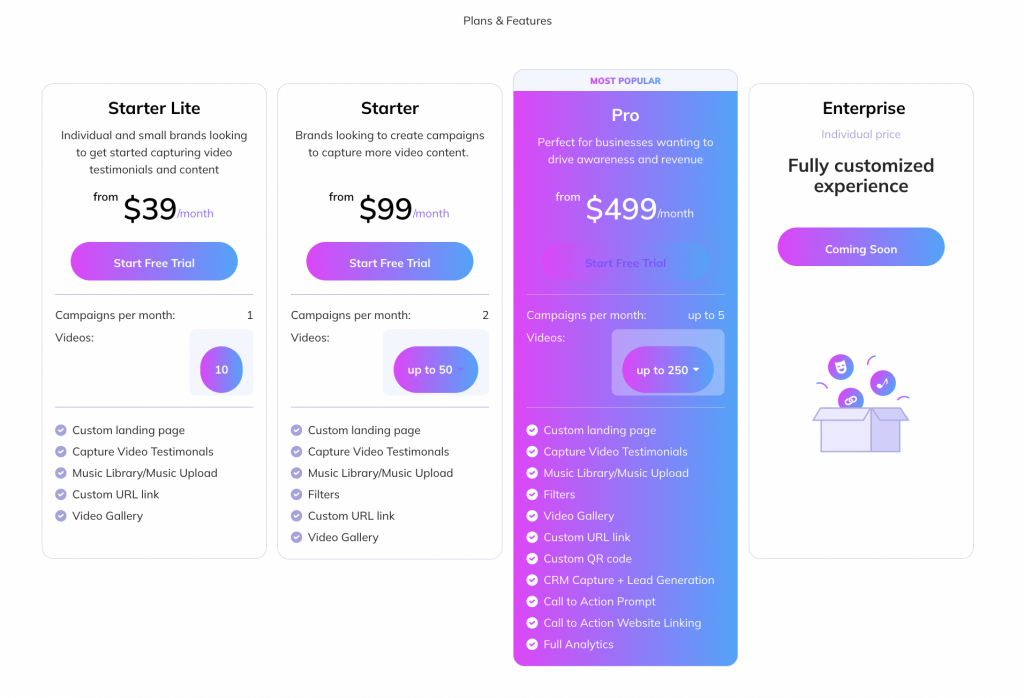
Summary: Vidlo is a strong choice for brands and music artists that want to run a video testimonial and content campaign that customers actually enjoy taking part in. It is easy to set up and track, recording feels fun rather than like a chore, and the different plans let you pick the one that fits your needs. Sign up for a free trial today!
Boast.io
Boast.io is a solid tool for collecting video testimonials, with a straightforward setup and useful data analytics. It does not offer much customization in terms of video filters or external sharing, but its intuitive interface and responsive support make it a reliable choice for larger teams.
Pros:
- Clear setup process with easy instructions and pre-built templates.
- Data access: track submissions and customer data directly in the platform.
- Free trial to test the platform before committing.
Cons:
- Limited customization: no video filters or external sharing options such as TikTok.
- Manual uploading: videos need to be added manually to build a Wall of Love for your website.
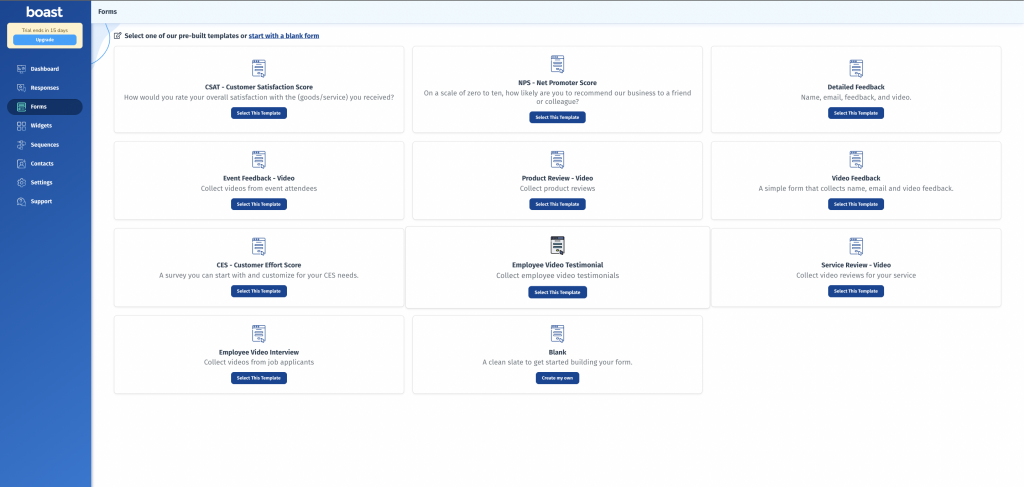
Pricing: Boast has four tiers: Basic, Team, Premium and Enterprise. Billed monthly, Basic is $59/mo, Team is $119/mo and Premium is $249/mo. Billed annually, Basic is $50/mo, Team is $100/mo and Premium is $208/mo. Enterprise pricing is available on request.
Summary: Boast is a good way to gather testimonials, but the lack of video customization may be a problem for brands that want a specific look. Collection is easy, with some limitations.
Senja
Senja lets you collect video, text and image testimonials, which gives you more flexibility in how you engage customers. It lacks video filters and a full analytics dashboard, but it keeps collection simple and handles many content types well.
Pros:
- Multi-format: collect text, video and image testimonials.
- Easy sharing to platforms such as Facebook, LinkedIn and WhatsApp.
- Budget-friendly plans for businesses of all sizes.
Cons:
- Limited analytics: no single page that shows all submission data.
- No video filters to customize the look of testimonials.
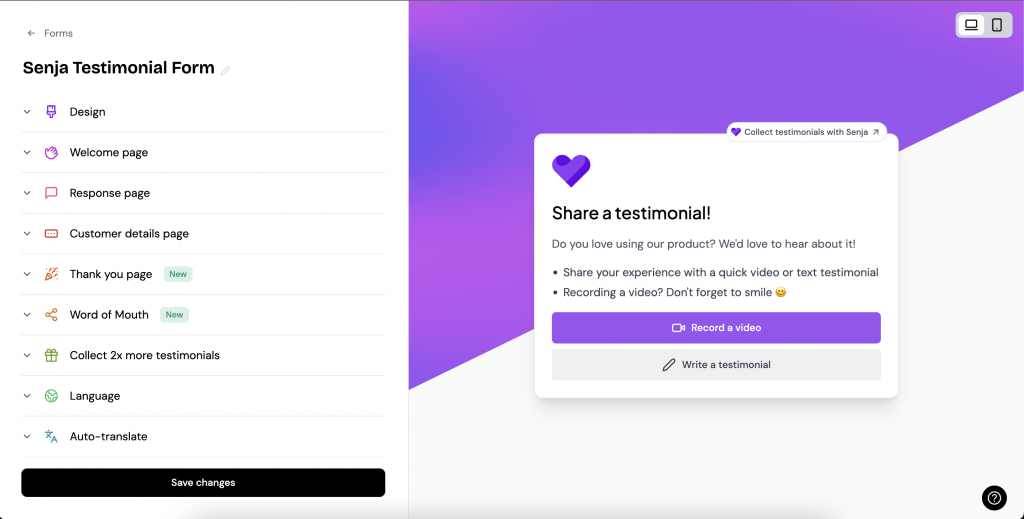
Pricing: Senja has two paid plans, Starter and Pro. Billed monthly, Starter is $29/mo and Pro is $59/mo. Billed annually, Starter is $24/mo and Pro is $49/mo.
Summary: Senja is a good option for brands that want to use several types of testimonials. Analytics are harder to follow, but everything else is easy to use and the pricing is affordable.
VideoAsk
VideoAsk offers an interactive, personalized experience in which your brand can ask questions on video and customers answer on video, audio or text. It gives you creative options for engagement, but the setup can be complex and customers cannot easily share or download their videos.
Pros:
- Interactive: engage customers directly through video questions.
- Customizable workflow: build from scratch or start from templates.
- Analytics: track interaction rates and video submissions.
Cons:
- Complex setup: many screens need to be configured.
- Limited sharing: customers cannot share or download their videos directly.
- Limited data collection compared with tools built for lead capture.
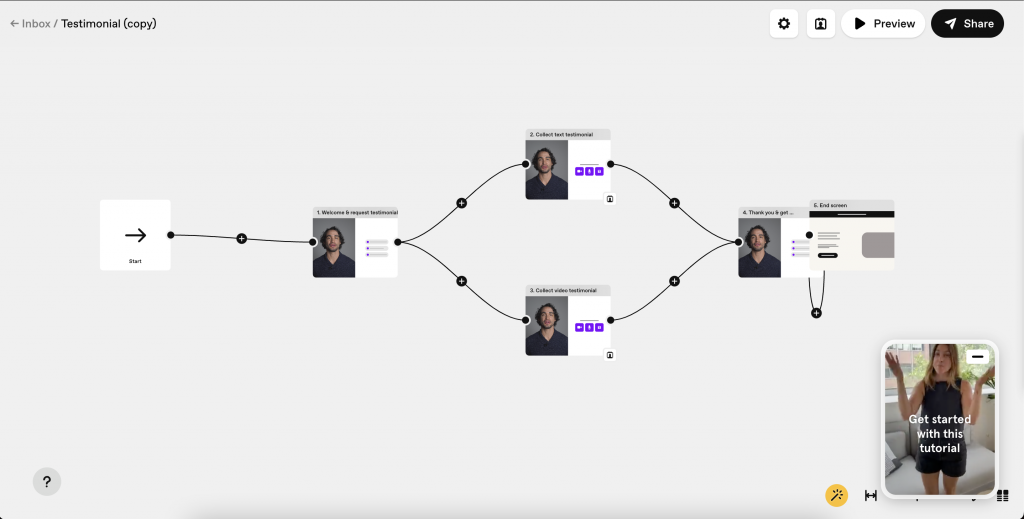
Pricing: VideoAsk has three plans: Start, Grow and Brand. Start is free but limited. Billed monthly, Grow is $30/mo and Brand is $50/mo. Billed annually, Grow is $24/mo and Brand is $40/mo.
Summary: VideoAsk is ideal for businesses that want a highly engaging, conversational customer journey and have the time to configure more complex flows.
Testimonial.to
Testimonial.to is a simple, no-frills platform for collecting text and video testimonials with minimal effort. It lacks advanced customization and video sharing, but it is a good option for brands that want a straightforward way to put testimonials on their website.
Pros:
- Quick and simple to create testimonial campaigns.
- Wall of Love for your website.
- Competitive pricing, including a free plan.
Cons:
- Limited customization: no video filters or templates.
- Customers cannot share their videos on external platforms.
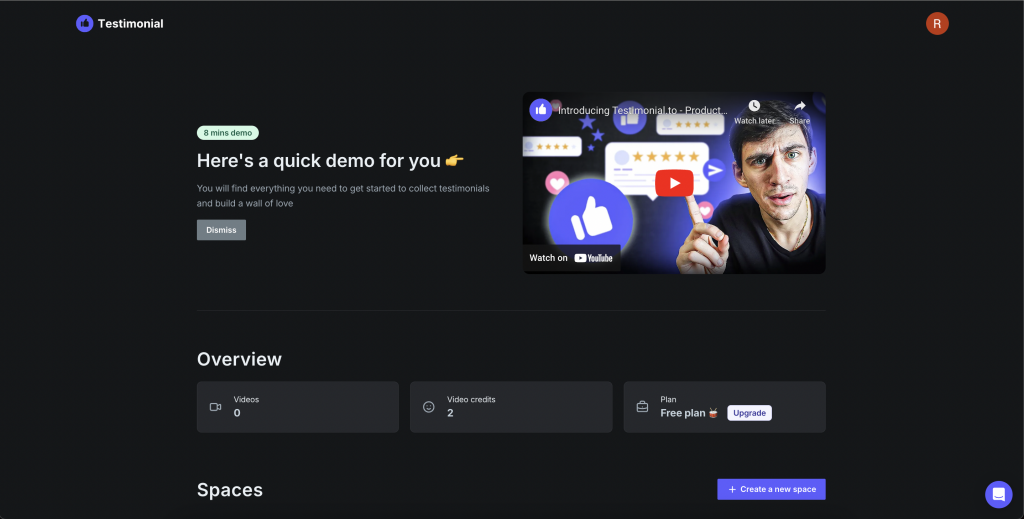
Pricing: Testimonial.to offers four plans: Starter, Starter Plus, Premium and Ultimate. Starter is free. Billed monthly, Starter Plus is $25/mo, Premium is $60/mo and Ultimate is $80/mo. Billed annually, Starter Plus is $20/mo, Premium is $50/mo and Ultimate is $70/mo.
Summary: Testimonial.to is a reliable tool for collecting testimonials and works best for businesses with simple needs that value ease over customization.
StoryPrompt
StoryPrompt offers a streamlined way to create video and text testimonials, with simple setup, AI-assisted features and effective tracking. Its social sharing options are more limited, which may matter to brands that rely on customers posting their own videos.
Pros:
- Quick setup for creating and sharing testimonial campaigns.
- Wall of Love to showcase testimonials on your website.
- Responsive support through live chat.
Cons:
- Fewer creative options such as video filters.
- Customers cannot share their videos to social media directly.
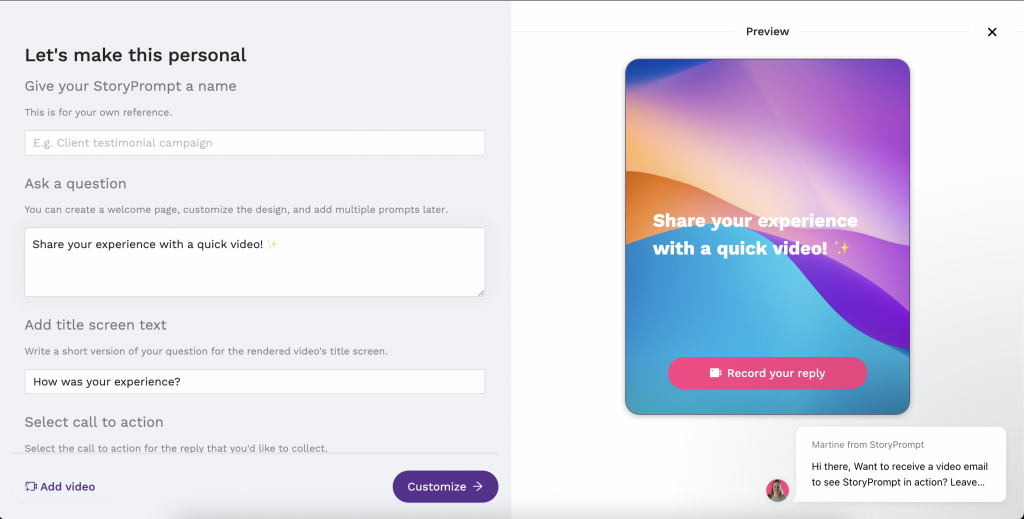
Pricing: StoryPrompt offers tiered plans (Starter, Professional and Premium), with paid plans starting at around $39/mo when billed annually. Plans change often, so check their pricing page for current details.
Summary: StoryPrompt is a solid option for brands focused on simple collection and polished story videos, but it offers less for teams that want customers to share testimonials socially.
Best Video Testimonial Software by Business Type
The best video testimonial software depends on your business model, marketing goals and how you plan to use customer stories. Here is a quick way to narrow down your options.
- SaaS companies: look for platforms that automate requests after onboarding, feature adoption or customer success milestones, with CRM integrations, transcription, embeds and analytics that sales and marketing can reuse.
- Ecommerce brands: prioritize fast mobile recording, user-generated content workflows, QR code collection, post-purchase requests and easy publishing on product pages and social media.
- Marketing agencies: multi-workspace management, white labeling, approval workflows and flexible branding make it easier to run testimonial campaigns for many clients.
- Small businesses: a free plan or trial, an intuitive interface, templates and affordable pricing matter more than enterprise-level customization.
- Enterprise organizations: look for security, role-based permissions, CRM integrations, API access, analytics and scalable approval workflows.
- Content creators and artists: simple editing, captions, branding and downloadable or directly shareable videos turn fan and customer feedback into ongoing content.
- Coaches and consultants: video prompts, guided questions and personal, branded landing pages help capture authentic success stories.
Most User-Friendly Video Testimonial Software for Non-Technical Customers
If your customers are not tech-savvy, ease of recording matters more than any other feature. The most user-friendly video testimonial software shares a few traits:
- One step to start: customers open a link or scan a QR code and start recording, with no app download, no account and no password.
- Mobile first: the recording page is designed for phones, with large buttons and the front camera ready to go.
- Clear prompts: two or three short questions on screen so people know what to say.
- Retakes and short limits: customers can re-record, and recordings are kept short, which lowers nerves.
- Something in return: a fun, branded result, such as a video they can share on their own social media, gives customers a reason to finish.
Among the tools above, Vidlo and Testimonial.to keep the recording flow the simplest, while VideoAsk is easy for customers but takes more setup on your side. To find the easiest software for website video reviews, test each tool’s recording page yourself on your own phone: if it takes more than a minute to start recording, your customers will drop off.
Free Video Testimonial Software: What You Actually Get
Several platforms offer a free plan or a free trial, and they are a good way to test how your customers respond before you commit:
- Testimonial.to has a free Starter plan with basic collection and a Wall of Love.
- VideoAsk has a free Start plan with a limited number of interactions.
- Senja offers a free plan with a cap on testimonials.
- Vidlo offers a free trial with the full branded campaign experience.
Free plans usually limit the number of videos, remove custom branding, or show the provider’s logo on your recording page. They work well for a pilot campaign; once testimonials become part of your regular marketing, a paid plan with full branding and data capture usually pays for itself.
Video Testimonial Platforms for Enterprises
An enterprise video testimonial capture platform has to fit into existing processes, not just collect videos. Beyond the basics, larger organizations should check for:
- Role-based permissions and approval workflows for legal and brand teams.
- Consent and release collection stored with every video.
- Multiple brands, regions or workspaces under one account.
- CRM, marketing automation and API access to trigger requests at scale.
- Analytics that show which campaigns, teams and locations generate the most videos.
Video Testimonial Software vs. Video Testimonial Services
Video testimonial services are agencies or production companies that interview your customers and film them, often on location. The results look polished, but each video can cost hundreds or thousands of dollars and takes weeks to produce. Video testimonial software lets customers record themselves, so you can collect many authentic videos quickly for the price of a monthly plan. Many brands use software for a steady stream of everyday testimonials and save production services for a few flagship case studies.
Which Video Testimonial Software Is Right for You?
There is no single solution that is best for every business. The right choice depends on your goals, team size, budget and how you plan to use customer stories once they are collected.
- Choose Vidlo if you want to collect authentic customer videos with as little friction as possible and encourage customers to share them on social media. It is especially well suited to brands focused on user-generated content, TikTok campaigns and scalable collection.
- Choose VideoAsk if you prefer interactive video conversations and guided question flows.
- Choose StoryPrompt if AI-assisted production and polished story videos are your top priorities.
- Choose Senja if you want text, image and video testimonials in one place.
- Choose Boast if your organization needs structured workflows and detailed feedback management.
- Choose Testimonial.to if you mainly want to embed testimonials on your website quickly with minimal setup.
Curious how Vidlo compares with Senja in detail? Read our Senja alternatives breakdown. And if your main goal is gathering more testimonials automatically, see our list of the best testimonial collection software.
Ultimately, the best video testimonial software is not the one with the most features. It is the one that makes it easiest for your customers to share authentic experiences, and easiest for your team to turn those stories into marketing that builds trust and increases conversions.
Frequently Asked Questions about Video Testimonial Software
What is video testimonial software?
Video testimonial software helps businesses collect, manage and publish customer video testimonials without professional production equipment. Customers record through a browser or phone using a link or QR code, and the business reviews, brands and publishes the videos from one dashboard.
What is the best software for creating testimonial videos?
For most brands that want branded, shareable customer videos with very little effort, Vidlo is a strong choice. VideoAsk suits interactive video conversations, StoryPrompt suits AI-assisted story videos, Senja suits mixed text and video testimonials, Boast suits larger teams, and Testimonial.to suits simple website embeds.
Which video testimonial software is easiest for non-technical customers?
Choose software where customers can record from a link or QR code without downloading an app or creating an account, on a mobile-friendly page with short on-screen prompts and the option to retake. Vidlo and Testimonial.to keep this flow especially simple.
Is there free video testimonial software?
Yes. Testimonial.to, VideoAsk and Senja offer free plans, and Vidlo offers a free trial. Free plans usually limit the number of videos or custom branding, so they are best for testing before you commit.
How do I collect video testimonials from customers?
Send customers a dedicated recording link or QR code right after a positive moment, such as a successful purchase, event or completed project. Keep the request short, give two or three guiding questions, and use software that lets them record in the browser without an app.
What features should I look for in video testimonial software?
Look for browser-based recording, branding, guiding questions, consent and data capture, captions or transcripts, embeds, social sharing, analytics and integrations with your CRM or automation tools.
Can I automate video testimonial requests?
Yes. Many platforms connect to CRM, email and automation tools to send requests automatically after purchases, onboarding or support interactions, so you build a steady pipeline of fresh stories without manual follow-ups.
How can I display video testimonials on my website?
Most platforms provide no-code embeds for landing pages, product pages and pricing pages, and many offer a Wall of Love page that groups multiple customer videos in one place. Place testimonials where buying decisions happen.
What is the difference between a testimonial video platform and a video testimonial service?
A platform is software that lets customers record themselves so you can collect many videos quickly and affordably. A service is an agency or production company that films customers for you, with higher quality but much higher cost per video.
How long should a video testimonial be?
Aim for 30 to 90 seconds. Short videos are easier for customers to record and easier for prospects to watch, and you can cut 15-second clips for social media and ads.
Is AI important in video testimonial software?
AI is not essential for collecting testimonials, but transcription, subtitles, summaries and highlight detection save a lot of editing time and help you publish customer stories faster.